
A project board that lives in your repository.
Backlog, milestones, Kanban, requirements, reports and an assistant, in one
.pb file next to the code.
Reading is free for everyone, for ever · every install starts with a trial of everything.
One file holds one project
Issues, requirements, milestones, labels, a workflow, comments, attachments and a log of who did what.
Plain JSON
The file is yours and stays plain JSON. Open as Text and Open as Board switch between the JSON and the board at any time.
Committed with the code
Commit the file like any other. The plan travels with the branch it describes.
Diffed in review
Changes to the board show up in the pull request, next to the changes to the code.
Edited offline
No server and no account are needed to use a board.
Your editor's colors
Open a .pb file and VS Code shows it as a board, themed with your editor's own colors.
Undo, save, Source Control
Everything saves by itself into the editor's text, so undo, the dirty marker, save and Source Control work as with any text file.
From an empty file to a running project
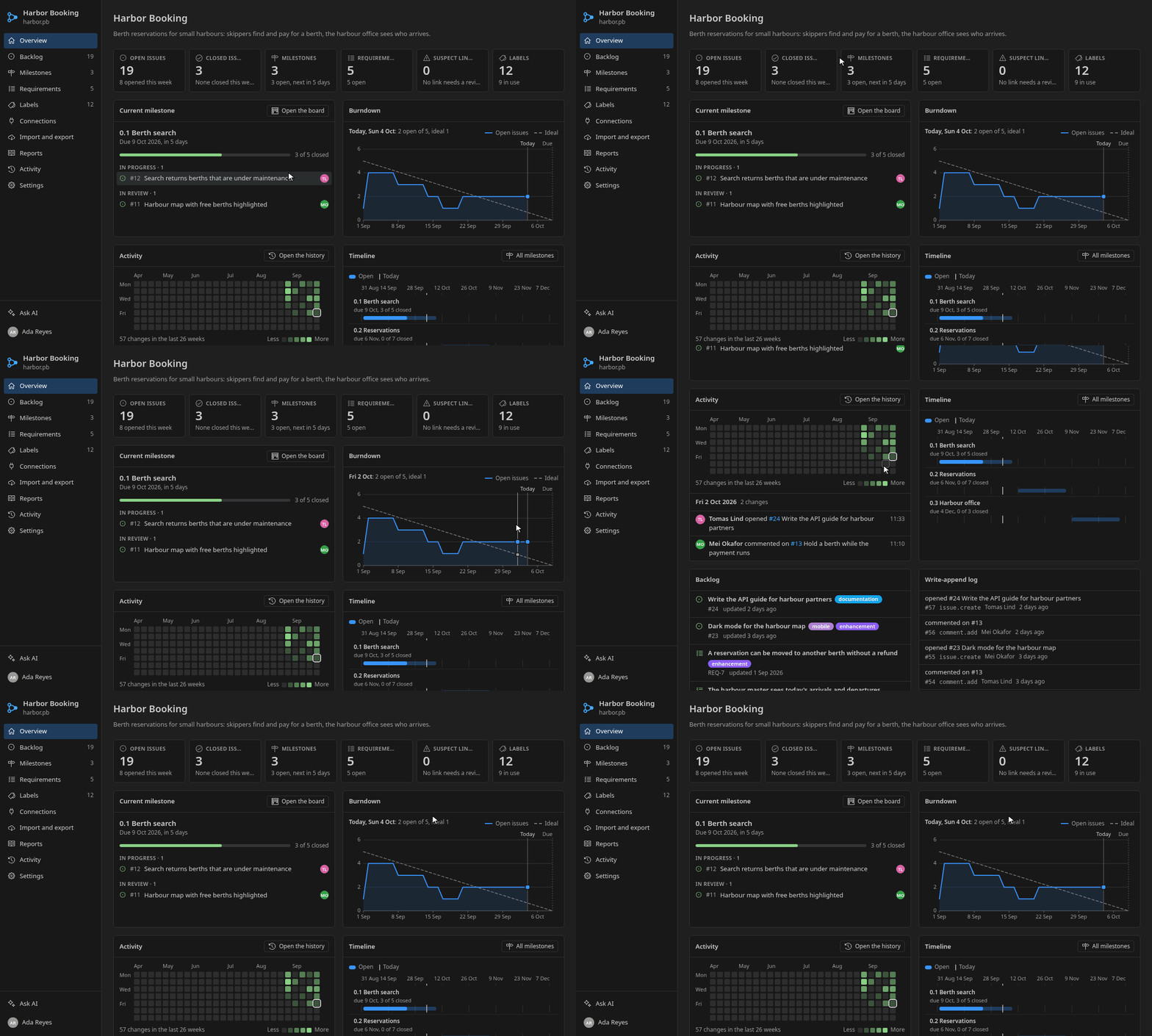
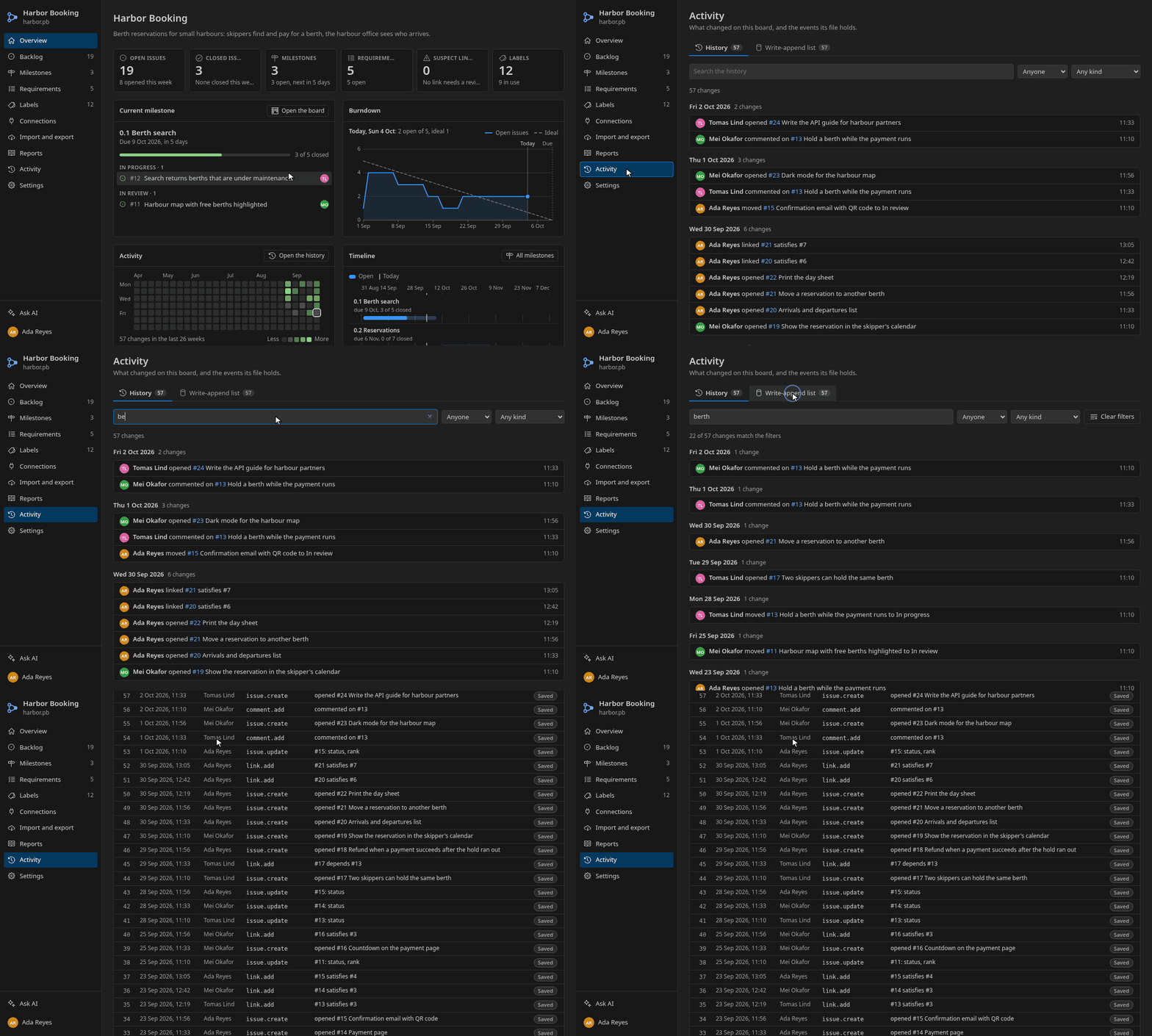
The pictures below show one board, harbor.pb, a small made-up project that books berths in harbours.
Create a board
Run Project Board: New Project Board from the Command Palette, pick a name, and the new .pb file opens as a board. Or from a terminal.
Commit the file like any other. Add *.pb text eol=lf to .gitattributes so line endings do not show up as changes.
# create a board from a terminal
pb init harbor.pb --name "Harbor Booking"
The overview
The first page answers "where are we": open and closed issues, the current milestone with its work in progress, a burndown against the ideal line, a heatmap of changes, the timeline of milestones and the latest activity.
The backlog
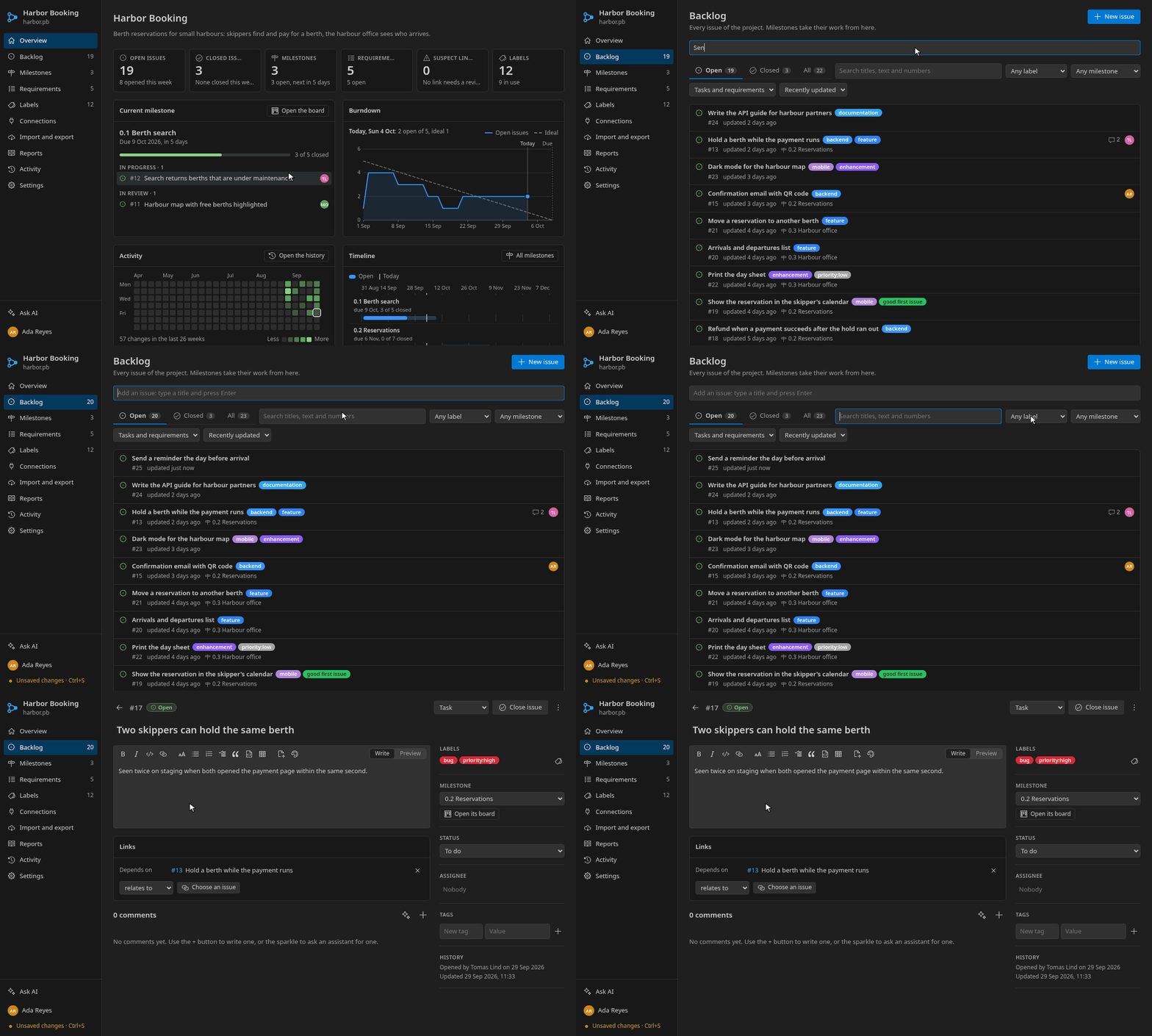
Every issue of the project. Type a title and press Enter to add one, search titles, text and numbers, and filter by label, milestone, kind and state.
An issue
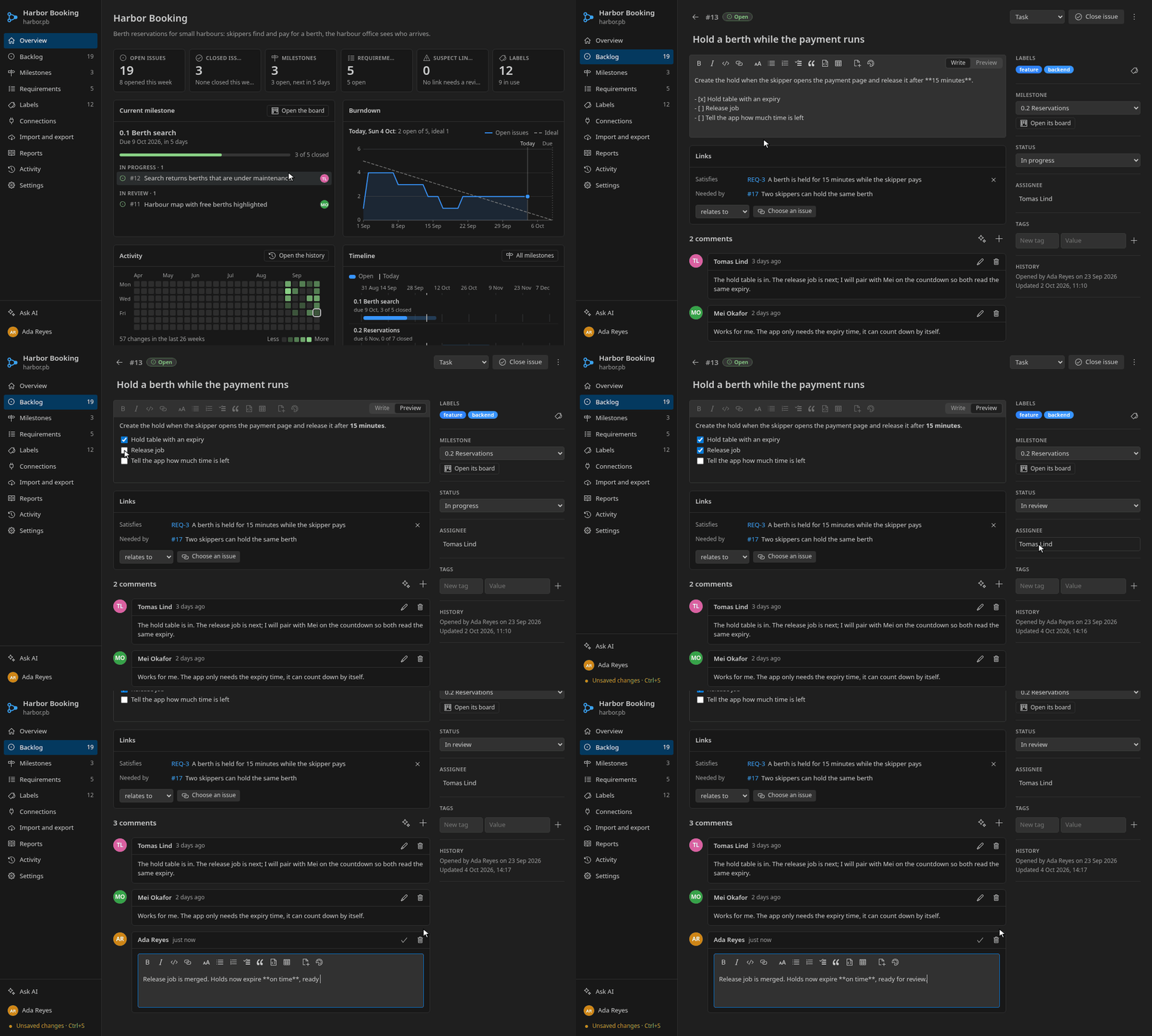
An issue has a Markdown description with a live preview, task lists you can tick in place, labels, a milestone, a status from your workflow, an assignee, tags, links to other issues and comments.
Milestones and the Kanban
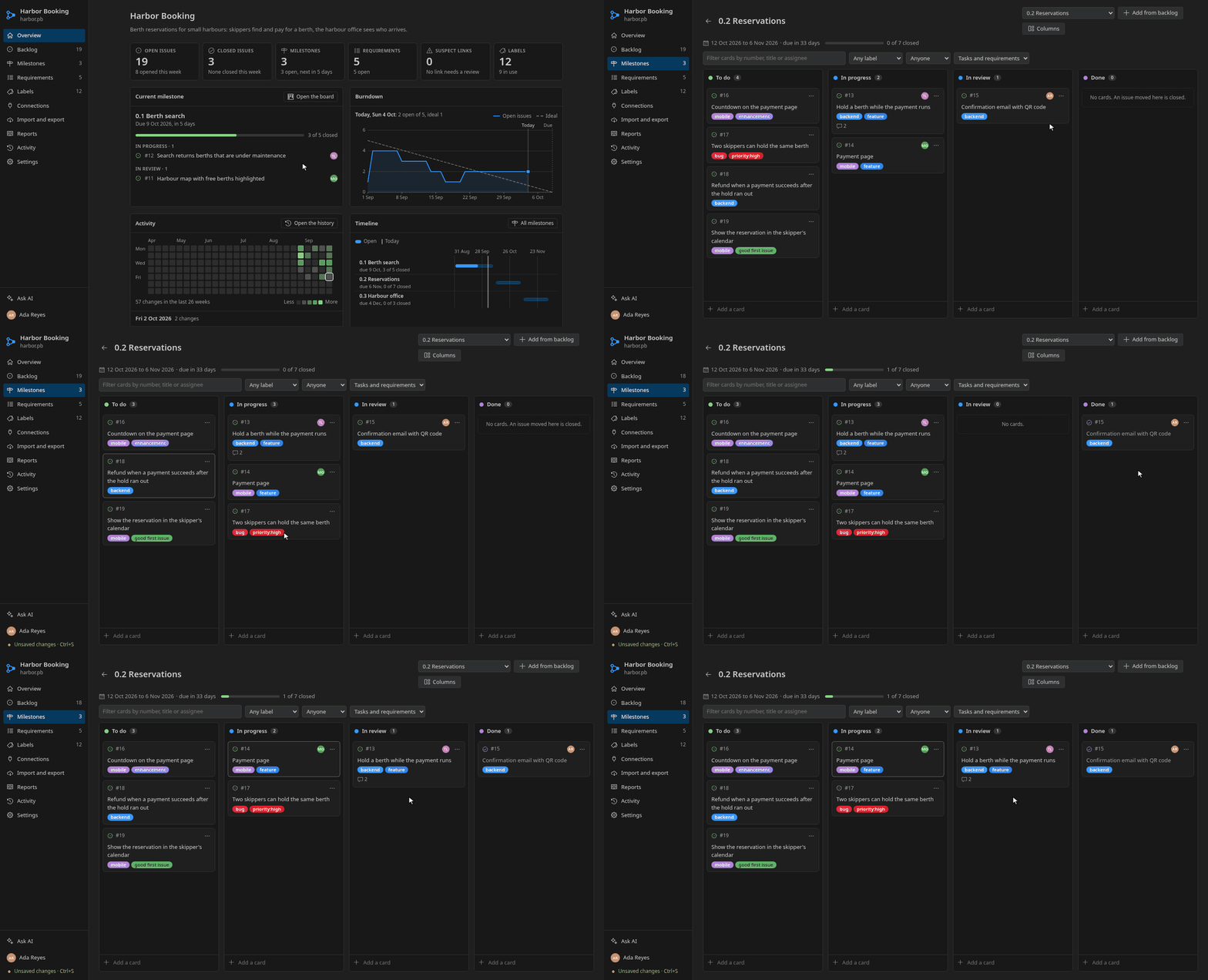
A milestone is a goal with dates and a progress bar. Each milestone has a board with one column per status of your workflow. Drag a card to give the issue another status.
The Columns button renames, adds, orders and removes the columns of every board.
Requirements, traceability and baselines
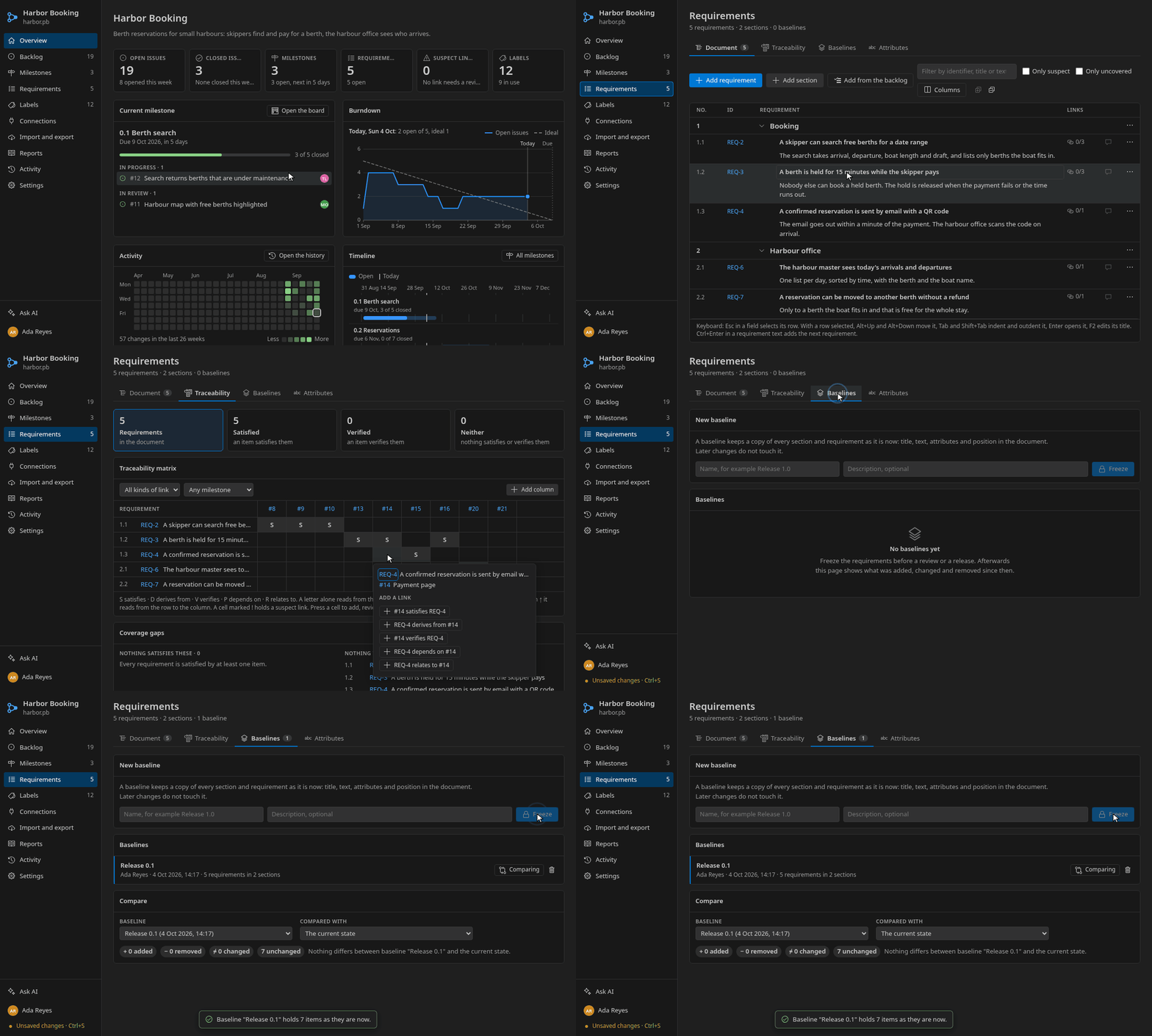
The Requirements page reads the backlog as a specification: numbered sections and requirements, each with its own identifier, text and attributes.
- Document: write and reorder requirements, and choose attribute columns.
- Traceability: a matrix of requirements against the work that satisfies, derives from, verifies or depends on them. Coverage gaps and suspect links are listed below it.
- Baselines: freeze the requirements under a name, then compare any baseline with today.
- Attributes: define the attributes requirements carry, such as type, priority and verification method.
Drawings and pictures
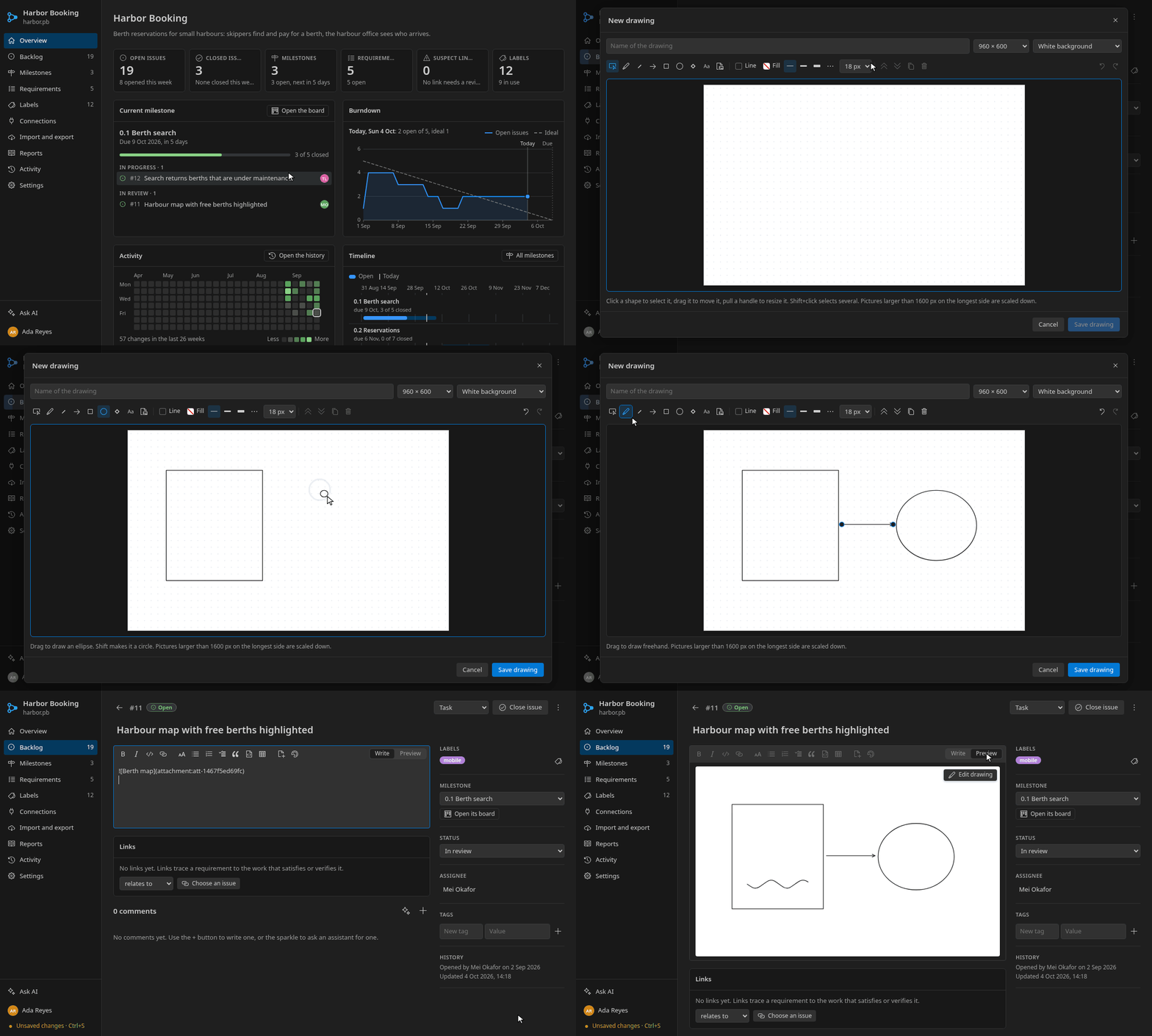
A description or a comment can hold drawings and pictures. The drawing editor has a pen, lines, arrows, rectangles, ellipses, diamonds and text. Drawings are stored inside the .pb file and stay editable.
The assistant
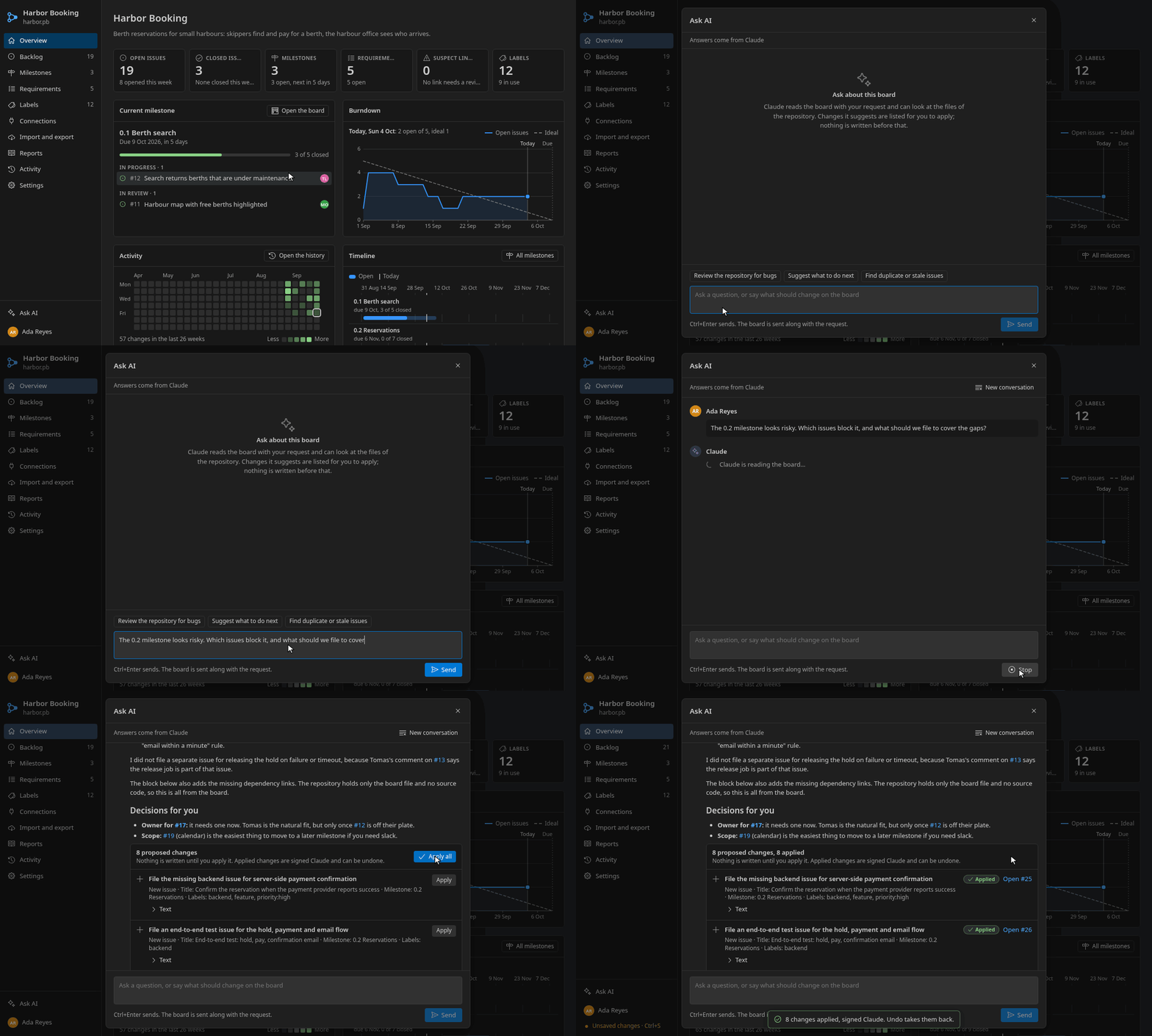
Ask AI opens an assistant that reads the board with your question. It runs Claude Code, or a language model of another extension such as GitHub Copilot. It may look at the repository, read only.
Changes it suggests are listed as proposals: nothing is written until you apply them, applied changes are signed with the assistant's name, and undo takes them back.
The recording shows a real answer of Claude Code; the wait for it is shortened.
Reports, export and import
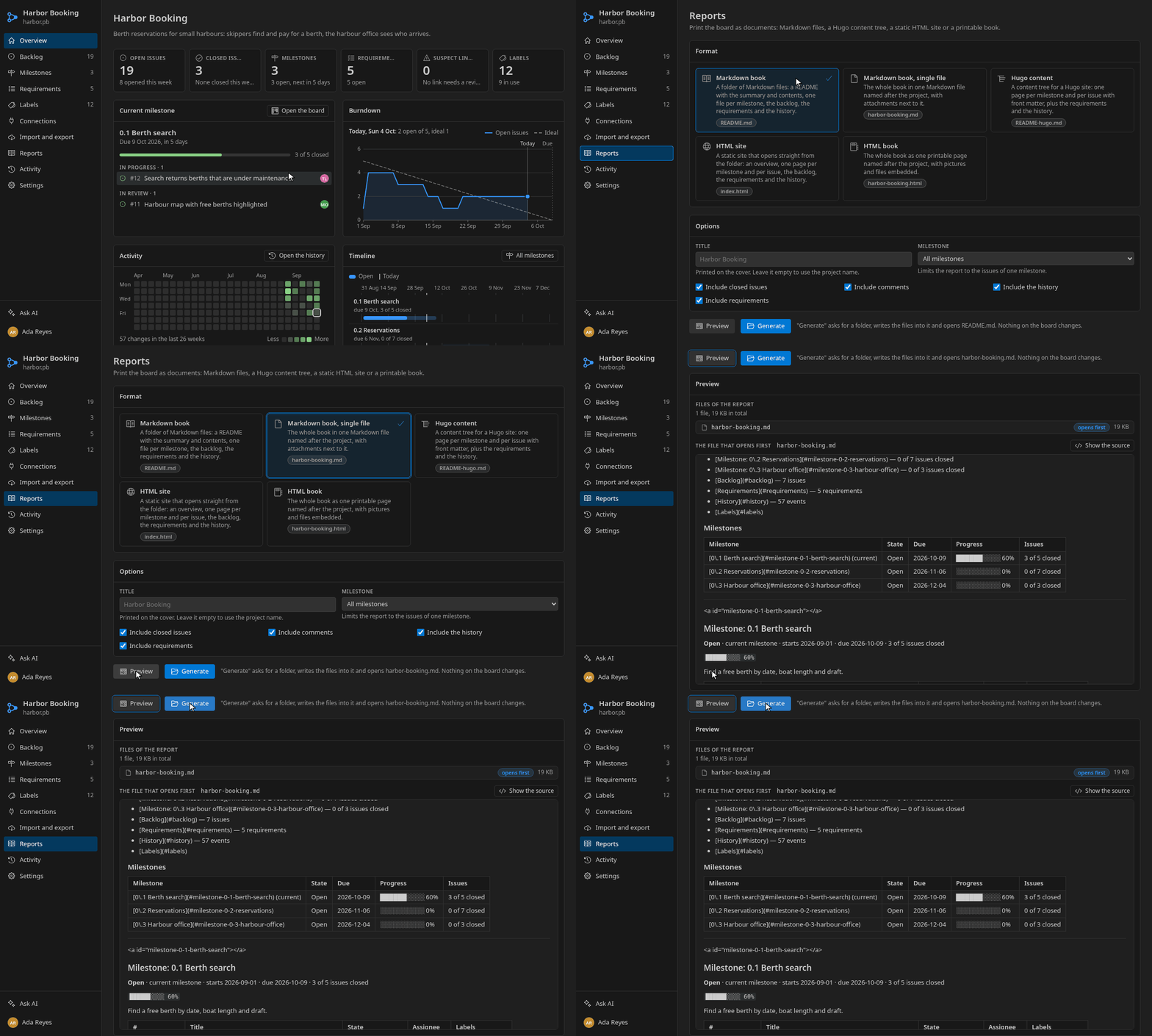
Reports prints the board as documents: a Markdown book, a single Markdown file, a Hugo content tree, a static HTML site or one printable HTML book. Choose a title, a milestone and what to include, preview the result, then generate it into a folder.
Import and export reads issues from CSV and from the exports of GitHub, GitLab, Redmine and Trac, and writes the board out again, as CSV for example (pb export --format csv).
Connections to other trackers
A board can be connected to GitHub, GitLab, Redmine and Trac to preview, pull and push issues, comments and milestones, and to Confluence to publish the report. Every synchronization shows what it will do first. Tokens stay in VS Code's secret storage and never reach the .pb file.
Activity and history
Every change is an event signed by its author. The Activity page shows the history by day, with search and filters by person and by kind, and the raw write-append list the file holds.
When the list grows, Consolidate the Event Log folds it into the project tree.
Claude Code and the pb command
Every integrated terminal gets a pb command that reads and edits boards:
$ pb issues --milestone "0.2 Reservations"
#13 open   In progress  Hold a berth while the payment runs  [0.2 Reservations] {backend, feature} @Tomas Lind 2 comments
#14 open   In progress  Payment page  [0.2 Reservations] {mobile, feature} @Mei Okafor
#15 open   In review    Confirmation email with QR code  [0.2 Reservations] {backend} @Ada Reyes
#17 open   To do        Two skippers can hold the same berth  [0.2 Reservations] {bug, priority:high}

$ pb close 17 --comment "Fixed by the unique hold index."
Commented on #17.
Closed #17.
When the board is open in the editor, pb edits it through the editor: changes appear at once, join the undo history and never clash with what you are typing. Run Claude Code in a terminal next to the open board and watch it comment on and close issues.
Run Project Board: Let Claude Code Edit Boards in This Folder (or pb skill --install) once per project. It writes a Claude Code skill to .claude/skills/project-board/SKILL.md that teaches Claude how to work with the board.
Agents in VS Code's own chat get two tools, pb_read_board and pb_apply_actions. The second asks for confirmation before it changes anything.
See the command line and AI agents.
Reading is free for everyone, for ever
Project Board comes in a Free plan and paid plans. A subscription pays for editing.
Free
Boards open read only, and nothing is ever locked away.
- Open and read every board, on every page
- Search, filter, history and the traceability matrix
- Reports: Markdown, Hugo and HTML
- Export, and open the file as text
- Create and edit issues, comments, milestones, labels and requirements
- Kanban drag and drop, drawings, baselines
- Apply the changes the assistant and chat agents propose
- Changes that
pband Claude Code make to a board open in the editor
Pro and Team 30-minute trial
Everything in Free, plus editing. The trial is the first 30 minutes after the first use, with everything available.
- Everything in Free
- Create and edit issues, comments, milestones, labels and requirements
- Kanban drag and drop, drawings, baselines
- Apply the changes the assistant and chat agents propose
- Changes that
pband Claude Code make to a board open in the editor
| Plan | Price | Seats |
|---|---|---|
| Pro | €4 a month | 2 devices |
| Pro yearly | €40 a year | 2 devices |
| Team | €15 a month | 5 devices |
After the trial, an installation without a subscription is on the Free plan. The file is yours and stays plain JSON. The client portal shows what is on sale today.
To use a plan, run Project Board: Sign In (or open Settings → Subscription on the board), or paste a license key with Project Board: Activate Subscription. See Plans and Manage Subscription open the portal. A paid installation keeps working offline: keys are checked on your machine, and the payments server is only asked from time to time. The key is kept in VS Code's secret storage, never in the .pb file. Licensing has the details.
Commands and settings
Commands
All commands are under Project Board in the Command Palette.
| Command | What it does |
|---|---|
| New Project Board | Creates a new .pb file and opens it. |
| New Issue | Adds an issue to the open board. |
| Go to Page... | Jumps to a page of the open board. |
| Show Activity | Opens the activity page. |
| Import Issues from a File | Opens the import page. |
| Ask the Assistant | Opens the assistant. |
| Consolidate the Event Log | Folds the event list into the project tree. |
| Open as Text / Open as Board | Switches between the JSON and the board. |
| Let Claude Code Edit Boards in This Folder | Installs the Claude Code skill. |
| Change the Name That Signs Edits | Sets pb.author.name. |
| Sign In / Sign Out / See Plans / Manage Subscription | Use the plan of your account, or subscribe to one. |
| Activate / Refresh / Deactivate Subscription | Enter a license key by hand, check it again, or remove it. |
Settings
| Setting | Default | Meaning |
|---|---|---|
pb.author.name, pb.author.email | empty | Who signs edits. Empty uses the git user of the board's repository. |
pb.activityLogLimit | 500 | Activity entries kept when the log is consolidated. |
pb.attachmentMaxKb | 2048 | Largest attachment, in KB. |
pb.ai.enabled | true | Show the assistant. |
pb.ai.claude.command | claude | The Claude Code command the assistant runs. |
pb.ai.claude.model | empty | Model passed to Claude Code. |
pb.ai.claude.readRepository | true | Let Claude read the repository, read only, when it answers. |
pb.ai.languageModel | true | Offer language models of other extensions. |
pb.cli.liveEditing | true | Let pb edit open boards through the editor. |
pb.cli.addToTerminalPath | true | Put pb on the PATH of integrated terminals. |
pb.license.serverUrl, pb.license.publicKey, pb.license.keyPrefix | empty | Replace the payments server and product the build was connected to. See licensing. |
Get it into VS Code
Requires VS Code 1.108 or newer.
Version 0.10.0 · 740 KB
# in VS Code:  Extensions ▸ ··· ▸ Install from VSIX... ▸ pick the file

# or from a terminal:
code --install-extension softforge-project-board-0.10.0.vsix
Then run Project Board: New Project Board from the Command Palette, or open any .pb file.
Keep the plan next to the code.
One file, committed with the code, diffed in review and edited offline. No server and no account.